Dev & Prod OTA channels

OSMIUM SOUND

A touchscreen-first hi-fi media appliance built on Debian for x86 hardware. Bit-perfect audio, streaming services, and OTA updates — all in one sleek dark interface.

Get started View on GitHub
x86 · Debian FLAC · DSD · 192kHz Deezer · Qobuz · TIDAL · Spotify MIT Open Source

Download & install

Flash one ISO image to a USB stick for the first install. From then on, every update — UI, system and OS — is delivered automatically over the air.

Download install ISOv2.5.19 View on GitHub
1

Download the ISO

Grab the install image hifi-player-v2.5.19.iso using the button above.

2

Flash a USB stick

Write the ISO to an 8 GB+ USB stick with balenaEtcher, Rufus or dd.

3

Boot & install

Boot your x86 mini-PC from the USB stick and follow the on-screen installer. Reboot — you're done.

Note: the installer asks which disk to install on before formatting it — nothing is wiped without confirmation (tested on UEFI; the ISO is only needed for the first install, every later version arrives automatically over the air).

Try it live: pick Try Osmium Sound (no install) at the boot menu to run the kiosk straight from the USB stick, nothing written to disk. If it doesn't log in automatically, use hifi / hifi at the login screen.

Everything your hi-fi setup needs

Built for audiophiles who want a dedicated, appliance-grade media server without the complexity.

🎵

High-Resolution Audio

Native playback of FLAC, DSD, and PCM up to 192kHz. Bit-perfect DoP output over USB — no resampling, no compromise.

FLACDSD64/128/256192kHzDoP
🎧

Streaming Services

Deezer, Qobuz, TIDAL, Spotify and more — unified in one interface via Lyrion plugins, installed in one click from the web UI. No app switching.

DeezerQobuzTIDALSpotify
📁

Music Library

Browse your local collection by Artist, Album, or Folder. Fast indexing powered by Lyrion Media Server.

ArtistsAlbumsFoldersLyrion
📻

Internet Radio

Built-in radio browser with thousands of stations worldwide. Save favourites directly from the touchscreen interface.

Radio BrowserFavourites
🔌

DAC Auto-Detection

Automatically detects USB DACs and audio interfaces. Switch outputs on the fly with persistent selection across reboots.

USB DACHDMI
⬆️

OTA Updates

Signed over-the-air updates for UI, API daemon, and OS. Switch between Production and Development channels from settings.

Ed25519 signedProd channelDev channel

Designed for the listening room

Optimised for touchscreens. Clean, dark, distraction-free.
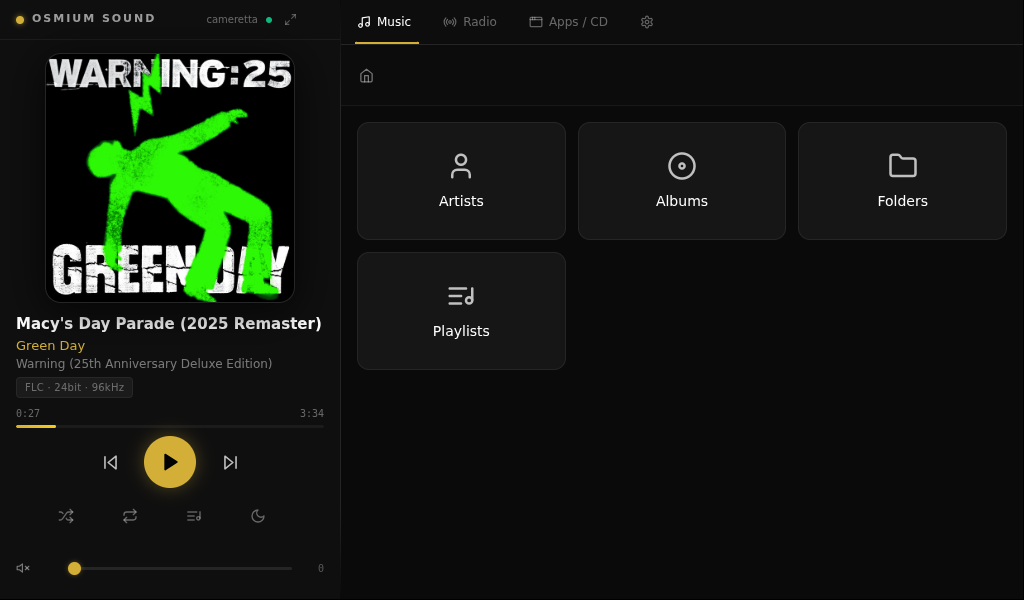
Built on solid foundations

Platform

Hardwarex86 / x86-64
OSCustom Debian distro
InterfaceElectron + React
BackendNode.js API daemon
Media serverLyrion Media Server
Update systemSigned OTA (Ed25519)
LicenseMIT

Audio

FormatsFLAC, DSD, MP3, AAC, WAV, AIFF
Max resolution32-bit / 192kHz PCM
DSD supportDSD64, DSD128, DSD256 (DoP)
OutputUSB DAC, HDMI
Playback modeBit-perfect (no resampling)
VU metersAnalog-style real-time display
StreamingDeezer, Qobuz, TIDAL, Spotify (via Lyrion plugins)

Android companion app

Control Osmium Sound from your phone. Browse your library, drive playback and the queue, and adjust volume — pair in seconds by scanning the QR code on the device's Settings screen.

Download APKv1.0.6 Release notes Add F-Droid repo
1

Download the APK

Grab HiFiMediaPlayer-companion-v1.0.6-release.apk using the button above.

2

Install it

Open the APK on your phone and allow install from unknown sources when prompted. Requires Android 8.0 or newer.

3

Pair by QR

On the same Wi-Fi, open the app and scan the pairing QR code from the device's Settings → Phone control.

Note: the companion app is distributed as a signed APK (sideload) or via our self-hosted F-Droid repo — it is not on the Play Store. Prefer F-Droid if you want automatic updates: tap Add F-Droid repo above (F-Droid app required), or add https://osmiumsound.qd.je/fdroid/repo manually under Settings → Repositories. Your phone and the appliance must be on the same local network.