Dev & Prod OTA channels

OSMIUM SOUND

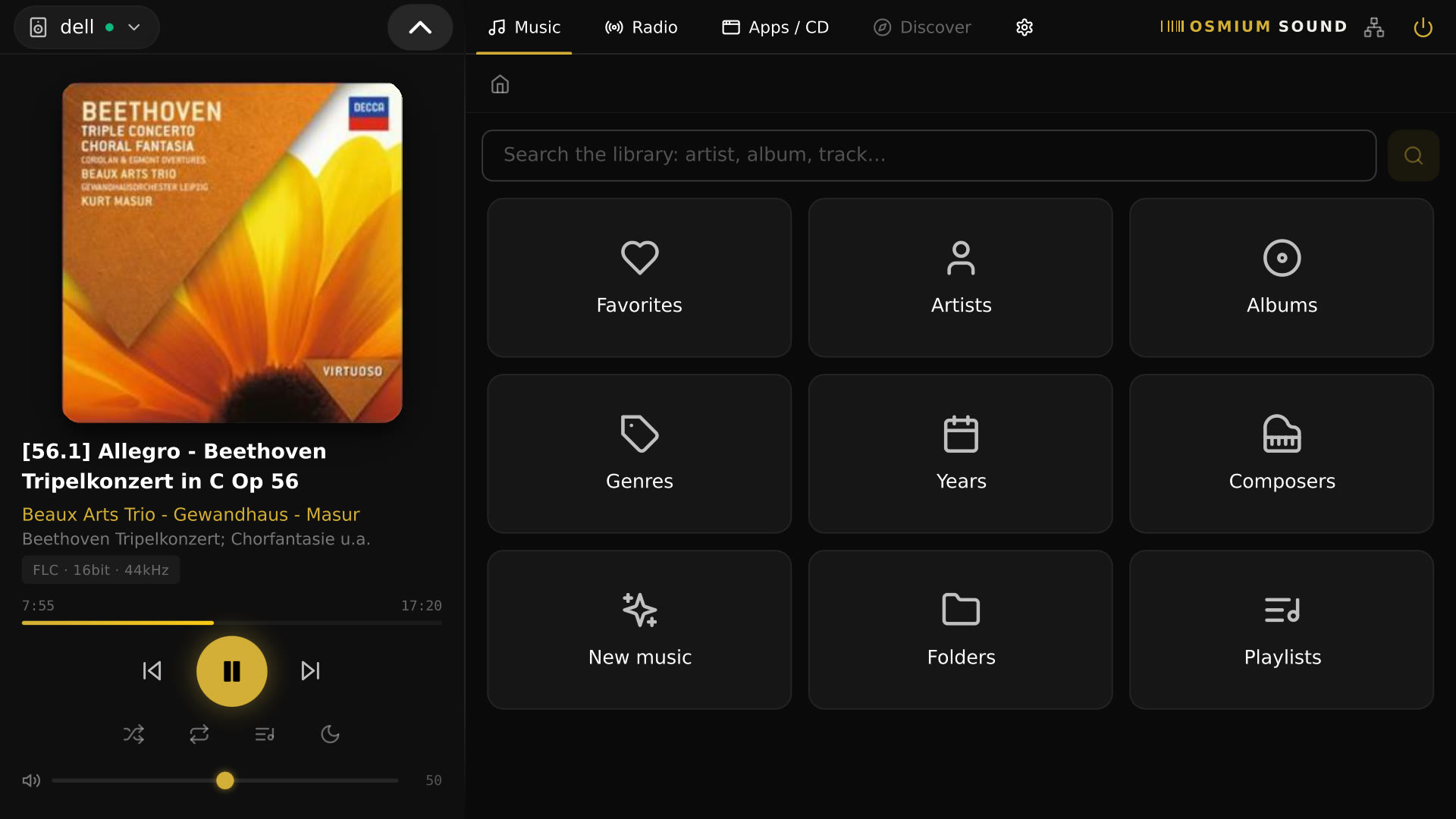
A touchscreen-first hi-fi media appliance built on Debian for x86 hardware. Bit-perfect audio, streaming services, and OTA updates — all in one sleek dark interface.

Get started View on GitHub
x86 · Debian FLAC · DSD · 192kHz Deezer · Qobuz · TIDAL · Spotify MIT Open Source

Download & install

Flash one ISO image to a USB stick for the first install. From then on, every update — UI, system and OS — is delivered automatically over the air.

Download install ISOv2.5.19 View on GitHub
1

Download the ISO

Grab the install image hifi-player-v2.5.19.iso using the button above.

2

Flash a USB stick

Write the ISO to an 8 GB+ USB stick with balenaEtcher, Rufus or dd.

3

Boot & install

Boot your x86 mini-PC from the USB stick and follow the on-screen installer. Reboot — you're done.

Note: the installer asks which disk to install on before formatting it — nothing is wiped without confirmation (tested on UEFI; the ISO is only needed for the first install, every later version arrives automatically over the air).

Try it live: pick Try Osmium Sound (no install) at the boot menu to run the kiosk straight from the USB stick, nothing written to disk. If it doesn't log in automatically, use hifi / hifi at the login screen.

Everything your hi-fi setup needs

Built for audiophiles who want a dedicated, appliance-grade media server without the complexity.

🎵

High-Resolution Audio

Native playback of FLAC, DSD, and PCM up to 192kHz. Bit-perfect DoP output over USB — no resampling, no compromise.

FLACDSD64/128/256192kHzDoP
🎧

Streaming Services

Deezer, Qobuz, TIDAL, Spotify and more — unified in one interface via Lyrion plugins, installed in one click from the web UI. No app switching.

DeezerQobuzTIDALSpotify
📁

Music Library

Browse your local collection by Artist, Album, or Folder. Fast indexing powered by Lyrion Media Server.

ArtistsAlbumsFoldersLyrion
📻

Internet Radio

Built-in radio browser with thousands of stations worldwide. Save favourites directly from the touchscreen interface.

Radio BrowserFavourites
🔌

DAC Auto-Detection

Automatically detects USB DACs and audio interfaces. Switch outputs on the fly with persistent selection across reboots.

USB DACHDMI
⬆️

OTA Updates

Signed over-the-air updates for UI, API daemon, and OS. Switch between Production and Development channels from settings.

Ed25519 signedProd channelDev channel

Designed for the listening room

Optimised for touchscreens. Clean, dark, distraction-free.

Built on solid foundations

Platform

Hardwarex86 / x86-64
OSCustom Debian distro
InterfaceElectron + React
BackendNode.js API daemon
Media serverLyrion Media Server
Update systemSigned OTA (Ed25519)
LicenseMIT

Audio

FormatsFLAC, DSD, MP3, AAC, WAV, AIFF
Max resolution32-bit / 192kHz PCM
DSD supportDSD64, DSD128, DSD256 (DoP)
OutputUSB DAC, HDMI
Playback modeBit-perfect (no resampling)
VU metersAnalog-style real-time display
StreamingDeezer, Qobuz, TIDAL, Spotify (via Lyrion plugins)

Android companion app

Control Osmium Sound from your phone. Browse your library, drive playback and the queue, and adjust volume — pair in seconds by scanning the QR code on the device's Settings screen.

Download APKv1.0.6 Release notes Add F-Droid repo
1

Download the APK

Grab HiFiMediaPlayer-companion-v1.0.6-release.apk using the button above.

2

Install it

Open the APK on your phone and allow install from unknown sources when prompted. Requires Android 8.0 or newer.

3

Pair by QR

On the same Wi-Fi, open the app and scan the pairing QR code from the device's Settings → Phone control.

Note: the companion app is distributed as a signed APK (sideload) or via our self-hosted F-Droid repo — it is not on the Play Store. Prefer F-Droid if you want automatic updates: tap Add F-Droid repo above (F-Droid app required), or add https://osmiumsound.qd.je/fdroid/repo manually under Settings → Repositories. Your phone and the appliance must be on the same local network.

Changelog

What's new in each stable release. Development builds ship more often on the Dev OTA channel.

v2.5.20 Latest 17 Jul 2026
  • NewDSP: named EQ presets (Flat, Warm, Bright, Loudness plus your own saved ones), advanced filter types (shelf, high-pass, low-pass) and a left/right balance control.
  • NewA 10-band graphic equalizer with a vintage analog console look is now the default EQ view on the touchscreen — the full parametric editor stays one tap away under "Advanced".
  • NewCompanion app 1.0.6: full DSP control from the phone — presets, balance and parametric EQ editing, kept in sync with the touchscreen in both directions.
  • NewChanging DSP settings during playback now briefly pauses and resumes at the same position instead of cutting the music off.
  • FixedMajor DSP reliability work: no more device conflicts with the DAC when toggling, presets actually apply when switched while DSP is on, DSP survives reboots with slow USB DACs, and a rare kernel panic on reboot with DSP active is avoided.
  • FixedThe touchscreen UI now recovers on its own when the player briefly disconnects (e.g. during a DSP change) instead of freezing until a reload.
  • FixedCompanion app: stays bound to the appliance's player when it briefly drops off the server (no more "unknown track"), and DSP controls lock while a change is applying so commands can't overlap.
v2.5.19 14 Jul 2026
  • NewInternal disks can now be adopted as music storage right from the touchscreen — formatted, mounted and shared over Samba automatically, no manual setup required.
  • NewThe install ISO now asks which disk to install on instead of always wiping the first one it detects, and adds a "Try Osmium Sound (no install)" live boot option to try the kiosk straight from the USB stick.
  • FixedRadio and plugin sub-menus (Qobuz, TIDAL, and others) weren't loading correctly because the app was reading the wrong keys in Lyrion's response.
  • FixedThe screensaver didn't wake up when playback started remotely (e.g. from the companion app or another synced device).
  • FixedSeveral UEFI boot reliability issues: duplicate boot entries created on every kernel update, and incorrect detection of the EFI boot partition on some setups.
v2.5.18 12 Jul 2026
  • NewMultiroom: a device can now follow another Osmium Sound's Lyrion server (with LAN auto-discovery) so both show up in the same sync group and can be grouped together, right from Settings → Multiroom — on the appliance and in the Android companion app.
  • NewEvery device can be given its own player name (instead of the default "OsmiumSound" on all of them), so grouped devices are easy to tell apart.
  • NewOn-screen keyboard: added a Shift key for uppercase letters.
  • FixedMultiroom grouping, the playback progress bar and the VU meter could get stuck after switching a device's Lyrion server or renaming a player (a squeezelite-restart timing race and a stale visualizer buffer).
  • FixedSetup wizard: the music-sources QR code now carries the pairing token, so the sources page opens authenticated instead of being rejected by the new token protection.
v2.5.17 12 Jul 2026
  • FixedSetup wizard: the music-sources QR code now carries the pairing token, so the sources page opens authenticated instead of being rejected by the new token protection.
v2.5.16 12 Jul 2026
  • FixedClosed a broader set of unauthenticated endpoints (backup/restore, SMB and USB sources, room-correction filter) and two stored-XSS issues in the Sources web page (security fixes).
  • FixedSSH now disables root login by default, and the pairing-token system is hardened (rate limiting, one-tap revocation, tighter file permissions).
  • FixedRestoring a backup no longer trusts its file paths without re-validating them first.
  • FixedAndroid companion app: confirms the appliance's address before applying a scanned pairing QR code.
  • NewAndroid companion app (v1.0.4) is now also available via our self-hosted F-Droid repo — no Play Store needed.
  • FixedAndroid companion app: removed a stale, non-functional "Privacy policy" link from the About screen.
v2.5.15 11 Jul 2026
  • NewThe paired Android companion app can now drive DSP settings and system admin actions (SSH, updates, reboot/shutdown, audio device) straight from the phone.
  • FixedClosed two pairing-token bypass gaps and hardened the backup/restore and room-correction filter endpoints (security fixes).
v2.5.14 11 Jul 2026
  • NewOptional DSP — parametric EQ, headphone crossfeed and room correction from an uploaded filter. Off by default, so bit-perfect playback is untouched.
  • NewMultiroom — group other players on the network to play in sync.
  • NewControl the player from any phone browser via a QR code — no app to install.
  • NewBackup and restore the device configuration (DAC, DSP/EQ, sources) from a browser.
  • NewLyrics view in Now Playing, alongside the VU meters.
  • NewMouse-pointer toggle for setups without a touchscreen.
  • FixedOTA updates now verify every extracted file and check free space before applying, with a fullscreen progress view.
  • FixedHardened URL handling in the interface (security fix).
  • NewThe Android companion app can now pair with the device by scanning a QR code.
v2.5.13 30 Jun 2026
  • NewJapanese, Chinese & Korean album and track names now display correctly (CJK fonts bundled).
  • FasterMuch smoother music library — lighter "now playing" updates and fluid scrolling even through thousands of albums.
  • FasterMore responsive Settings: background services no longer block the screen during updates, scans or network changes.
  • FixedHardened the Sources web service and removed dead/duplicate system code.
v2.5.11 26 Jun 2026
  • NewSetup wizard can now install Lyrion Media Server automatically if it's missing.
  • NewUEFI Secure Boot support, applied at image-build time.
v2.5.10 26 Jun 2026
  • NewNative Sources manager — add and manage USB, SMB and local music sources straight from the touchscreen.
  • NewAutomatic USB drive mounting; SMB mounts retry in the background so they survive a fast boot.
  • NewAndroid-style submenu navigation in Settings, with styled in-app confirm dialogs for reboot/shutdown.
  • FasterQuicker boot — slimmer initramfs, masked boot-delaying services, and unused Bluetooth dropped at startup.
v2.5.9 23 Jun 2026
  • NewFull playback controls — shuffle / repeat, play queue, sleep timer, playback preferences and alarms.
  • NewBrowse and save playlists in the Music tab, plus a "Rescan library" button.
  • FixedOS version stays visible when an update check fails; OTA manifest now served from GitHub Pages to dodge API rate limits.
  • FasterLower renderer CPU usage from the analog VU meter, and a smoother boot intro on the x86 mini-PC.
v2.5.8 22 Jun 2026
  • NewRebrand to Osmium Sound, with a brand-new presentation site.
  • NewSigned OS OTA pipeline — update runner, apply.d migrations and idempotency checks in CI.